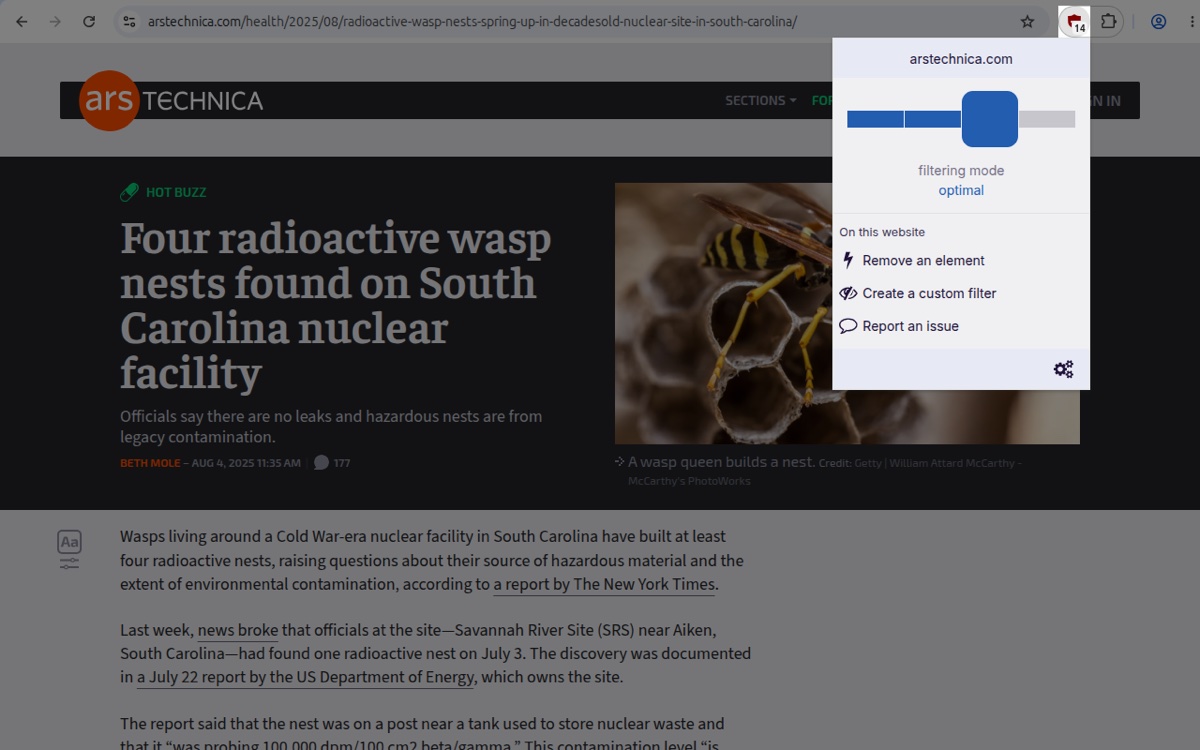
uBlock Origin cannot be used in Google Chrome anymore. Chrome stopped running extensions of its kind in 2025, and on August 31, 2026 the Chrome Web Store removed the last of them, uBlock Origin included. No setting brings it back. You have three realistic options: install uBlock Origin Lite in Chrome, move to Firefox, where the full uBlock Origin still works, or use a browser that blocks ads without an extension.
Your options at a glance
| Option | What you get | What you give up |
|---|---|---|
| uBlock Origin Lite in Chrome | A free blocker by the same author, with the same default filter lists | The advanced features of uBlock Origin |
| Firefox with uBlock Origin | The full extension, as you know it | You change browsers |
| A browser with a built-in blocker | Ad blocking with no extension to install | You change browsers and rely on the blocker its maker built |
What happened to uBlock Origin in Chrome
Chrome extensions are built on a platform that Google calls Manifest. uBlock Origin was written for version 2 of it. Google replaced that version with Manifest V3 and switched the old one off in steps. Chrome’s own timeline lists them:
- October 9, 2024: Chrome starts to turn off installed Manifest V2 extensions.
- March 31, 2025: Manifest V2 extensions are off by default for everyone. Users can still turn them back on.
- July 24, 2025: With Chrome 138, they are off for all users and can no longer be turned back on. In Chrome 139 and later they do not run at all.
- August 31, 2026: All remaining Manifest V2 extensions are removed from the Chrome Web Store. They cannot be installed again.
The uBlock Origin project confirms the last step on its own page: its Chrome Web Store listing was removed on August 31, 2026.
If uBlock Origin is still listed on Chrome’s extensions page, it is turned off and you can only remove it. To check, click More (the three dots at the top right) and choose Extensions → Manage extensions.
Why there is no new uBlock Origin for Chrome
Under Manifest V2, an ad blocker could look at each request the browser was about to make and decide on the spot whether to block it. Manifest V3 in Chrome takes that ability away. The extension hands the browser a set of rules in advance, and the browser applies them.
Much of what made uBlock Origin strong depends on the old way of working. The project states plainly that there is no Manifest V3 version of uBlock Origin. Its author, Raymond Hill, wrote a separate and smaller extension for the new platform: uBlock Origin Lite.
Option 1: uBlock Origin Lite in Chrome
uBlock Origin Lite, or uBO Lite, is free and comes from the same author. Its default rules cover at least uBlock Origin’s default filter set: uBlock Origin’s own lists, EasyList, EasyPrivacy and Peter Lowe’s ad and tracking server list. It is the closest thing to uBlock Origin that Chrome still allows.
How to install it
- Open the uBO Lite project page and follow its link to the Chrome Web Store. Starting there keeps you away from copies with similar names.
- Select Add to Chrome, then confirm with Add extension.
- If the old uBlock Origin is still listed under More → Extensions → Manage extensions, select Remove on it and confirm.
The three filtering modes
- Basic: blocks network requests with the selected filter lists. It does not need permission to read and change data on websites.
- Optimal: the default. It adds filtering written for specific sites and needs permission to read and change data on all websites. If you do not give that permission, uBO Lite falls back to Basic.
- Complete: adds generic cosmetic filtering, the general rules that hide leftover ad boxes on a page. The project notes that this can make pages use more resources.
The picture at the top of this post shows the uBO Lite panel in Chrome, with the slider set to optimal. To change the mode for the site you are on, click the uBO Lite icon and move the filtering mode slider. All the way to the left turns uBO Lite off for that site. To change the mode for all sites, click the gear icon in the same panel and choose a Default filtering mode.
What uBO Lite can and cannot do
uBO Lite has gained features since its first versions. According to the project’s quick guide and FAQ, the panel offers Remove an element for a one-time cleanup of a page and Create a custom filter to hide an element for good. You can also subscribe to extra filter lists.
The same FAQ lists what is missing compared with uBlock Origin:
- No dynamic filtering. The point-and-click rules that advanced users wrote in uBlock Origin cannot be supported.
- No per-site switches for remote fonts, scripts or large media elements.
- Some filters do not carry over. Certain kinds of filters cannot be translated into the new rule format. The FAQ says uBO Lite is less effective on sites that fight ad blockers and at keeping pages from breaking.
- List updates wait for the extension. The built-in lists are updated only when the extension itself gets a new version.
Raymond Hill does not present it as a drop-in successor. In the FAQ he calls uBO Lite “too different from uBO to be an automatic replacement.” If you installed uBlock Origin and never opened its settings, you may not notice much. If you relied on its advanced features, you will.
uBO Lite also exists for Edge, Firefox and Safari. For Safari, see our guide on how to get rid of ads in Safari on Mac.
Option 2: Firefox with the full uBlock Origin
Firefox does not follow Chrome here. Mozilla wrote in February 2025 that Firefox keeps Manifest V2 alongside Manifest V3, including the part that lets a blocker decide about each request. The uBlock Origin project says the extension works best on Firefox, on desktop and on Android.
- Install Firefox.
- In Firefox, open uBlock Origin on Firefox Add-ons. Check that it is by Raymond Hill and carries the Recommended badge.
- Add the extension and confirm the permissions it asks for.
The price is a different browser. Our comparison of Firefox and Chrome covers what else changes, and our overview of ad blocker add-ons for Firefox shows the alternatives to uBlock Origin there.
Option 3: a browser with a built-in ad blocker
A blocker that is part of the browser does not depend on the extension platform, so Manifest V3 does not touch it. You trust the maker of the browser instead of the author of an extension.
- Brave is a free browser built on the same engine as Chrome. Its blocker, Shields, is built in, and Brave says Manifest V3 does not weaken it. Brave also offers the old uBlock Origin from its own servers, under brave://settings/extensions/v2. Brave describes this as best effort: it will keep the extension available for as long as it is able to.
- Kingpin, our private browser for Mac, is built on the same engine as Chrome too. It blocks ads and trackers by default with the EasyList, EasyPrivacy and uBlock Origin filter lists, updated daily, and you can switch blocking off for a single site. It is not uBlock Origin, though. Kingpin has no extensions at all, so you cannot add uBlock Origin, a password manager or any other add-on. It is a paid app and for Mac only.
Edge and other Chrome-based browsers
Microsoft Edge is not a way around the change. Microsoft’s timeline gives November 2026 as the month when users can no longer turn Manifest V2 extensions back on in Edge and consumer support for them ends. For company-managed computers, Microsoft expects the phase-out to begin in early 2027.
Other browsers built on Chrome’s engine inherit the change unless their makers do extra work to undo it, as Brave does. Before you switch to one of them to keep uBlock Origin, read what its maker currently says about Manifest V2.
What no longer works
Many older guides describe ways to keep uBlock Origin running in Chrome. They are out of date.
- Turning the extension back on. The switch has been gone since Chrome 138.
- The company policy. Administrators could keep Manifest V2 extensions running with a policy. Chrome 138 was the last version that honored it.
- Startup flags. 9to5Google reported in June 2026 that Chrome was removing the flags those guides relied on.
- Staying on an old Chrome. A Chrome from mid-2025 misses more than a year of security fixes. Our post on Chrome updates explains why that is a bad trade.
- Downloading “uBlock Origin for Chrome” from another site. The real one is no longer offered for Chrome, so a download with that name deserves suspicion. An ad blocker can read every page you open, which is why copies are dangerous. See how to tell a genuine ad blocker from a copy.